
Checking Vendor Hold Status
If a vendor (including state employees and university students) has a delinquent debt with a state agency or university, the state agency or university must report it to the Texas Comptroller’s Office. The vendor is considered to be “on hold” with the state and state agencies and universities may not issues payments to the vendor until the hold is released.
The UHS Finance System receives a nightly feed from TINS (the Comptroller’s vendor database) that automatically updates the hold status of UHS vendors. If a UHS vendor is on hold with the state, The Open for Ordering box for that vendor will be unchecked. If a vendor is not on hold or changes from a hold to a non-hold status, the Open for ordering box will be checked. Comptroller’s Office policy in conjunction with state law requires state agencies and universities to verify a vendor’s hold status for local voucher payments over $500 and for local P-Card purchases over $500.00. In addition, we are required to verify a vendor’s status prior to signing a written contract that will be paid with local funds. Comptroller’s policy:
The policy does not require the verification for state voucher payments or prior to entering into contracts that will paid only with state funds since the Comptroller’s Office has a mechanism to hold a and apply state payments to the vendor’s liabilities. Also, this policy does not apply to emergency purchases.
The requirement for verifying vendor hold status on local voucher payments over $500 is handled by the UHS Finance System, which automatically verifies vendor hold status before issuing payments. The system will not issue a local fund payment to a vendor on hold. Likewise, USAS (the Uniform Statewide Accounting System) will not issue a state fund payment to a vendor on hold. When the hold is released, the local or state fund payment is issued automatically.
The UHS Finance System also does not allow UHS departments to create requisitions for vendors on hold. This is an additional control to prevent POs from being issued to vendors on hold. The following matrix shows when departments are required to verify vendor hold status:
| Purchase Method (Fund Type) |
Vendor Hold Status Verification Requirement |
| Voucher (State and Local) |
No Verification Require The vendor’s hold status is verified automatically before issuing a |
| P-Card (Local) |
Purchases over $500
Purchases of $500 or less |
| Contract (Local) |
Verification is Required Prior to Signing the Contract Verification may occur no earlier than seven days before the contract is |
| Contract (State) |
No Verification Required The vendor’s hold status is verified automatically before issuing a |
To determine the vendor’s hold status, you can navigate to the Vendor Hold Tool from
the main menu using the following path:
Main Menu → Custom Reports → AP → Vendor Hold

There are two search scenarios:
1. Individual Vendors
2. Business Vendor
Part 1: Individual Vendor
For individual Vendors, we search by Supplier Name (Wildcard) only, please follow
the steps below:
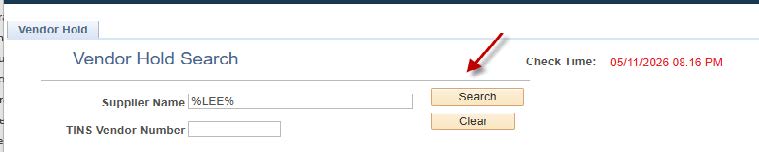
1) In the Supplier Name Field: Enter %Lee% (Use %Last Name% Format)
2) Click “Search”
3) Returned Result:
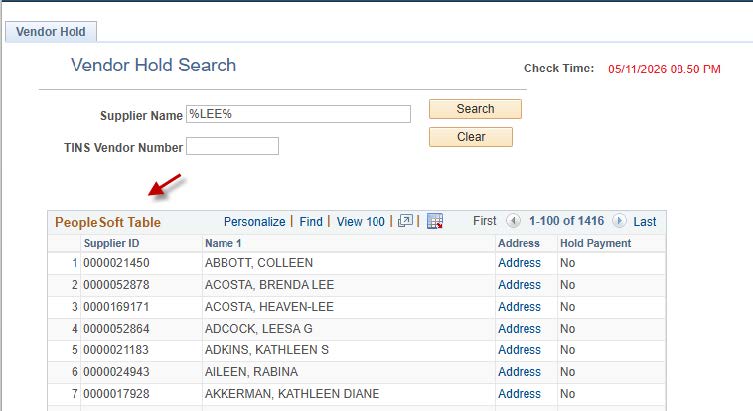
o The system will return a list of all vendors whose names contain “Lee”. You will
see two tables in the
results
I. PeopleSoft Table
This table contains all vendors setup in PeopleSoft.
• If vendor has a hold, you will see “Yes” under the “Hold payment” Column;
• If Vendor does not have a hold, you will see “No
II. State Table
This table contains state hold data for vendor hold records, including vendors set
up in PeopleSoft.
• If a vendor appears in the State Table, it means the vendor currently has a
hold.
4) Once you locate the vendor, you will also be able to see the timestamp at the top
right near the search icon.
Please save the result as a PDF and highlight the specific vendor you are looking
for the vendor hold status for
your supporting document.

Part 2. Business vendor
There are two ways to search for business vendors.
A. Search by Supplier Name (Wildcard)
Please follow the steps below:
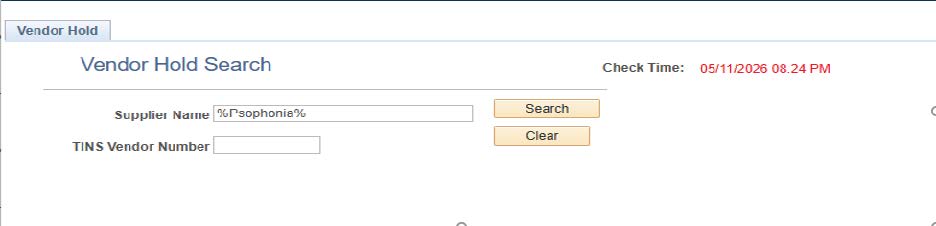
• Supplier Name: Enter a partial legal business name: %Psophonia%
• Click “Search”
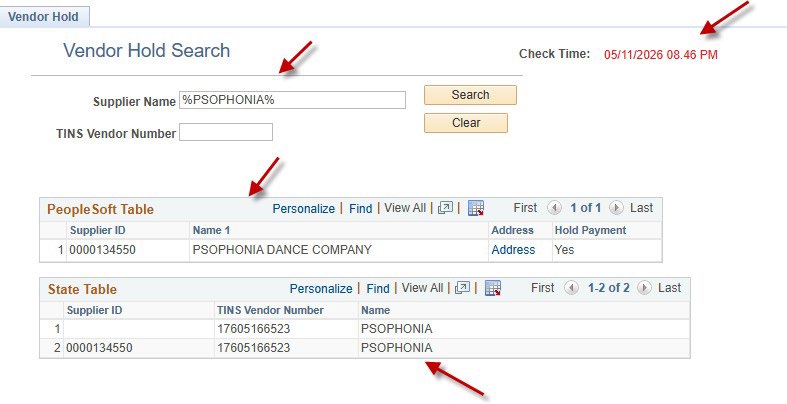
• The system will return a list of all vendors whose names contain “Psophonia”. You
will see two tables
in the results:
I. PeopleSoft Table
This table contains all vendors setup in PeopleSoft.
• If vendor has a hold, you will see “Yes” under the “Hold payment” Column;
• If Vendor does not have a hold, you will see “No.”
II. State Table
This table contains state hold data for vendor hold records, including vendors set
up in PeopleSoft.
• If a vendor appears in the State Table, it means the vendor currently has a
hold.
• Once you locate the vendor, you will also be able to see the timestamp at the
top right near the
search icon.
Please save the result as a PDF and highlight the specific vendor you are looking
for the vendor hold
status for your supporting document.
B. Search by TINS Vendor Number (Wildcard)
• TINs Vendor Number: Enter a partial TINS (Tax Identification Number) number: %60516652%
• Click “Search”
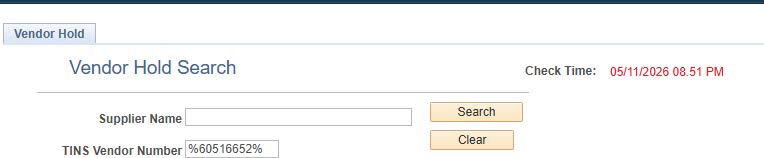
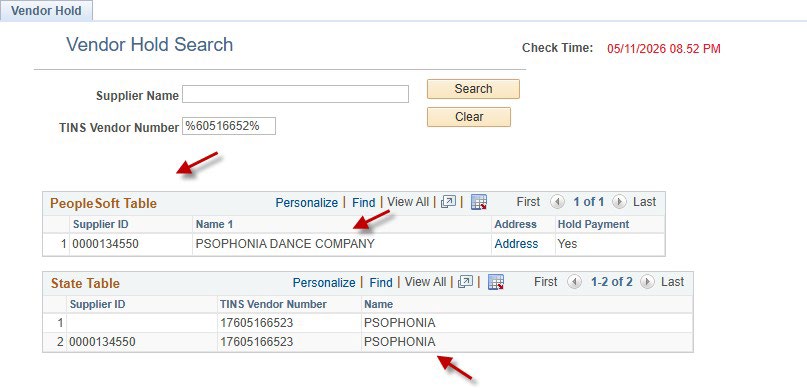
• The system will return a list of all vendors whose TINS contain “60516652”.
You will
see the two tables in the results
I. PeopleSoft Table
This table contains all vendors setup in PeopleSoft.
• If vendor has a hold, you will see “Yes” under the “Hold payment” Column;
• If Vendor does not have a hold, you will see “No.”
II. State Table
This table contains state hold data for vendor hold records, including vendors set
up in
PeopleSoft.
• If a vendor appears in the State Table, it means the vendor currently has a
hold.
• Once you locate the vendor, you will also be able to see the timestamp at the
top right near the
search icon.
Please save the result as a PDF and highlight the specific vendor you are looking
for the vendor hold
status for your supporting document.
Note: If you are experiencing issues, please reach out to UHD Accounts Payable at accountspayable@uhd.edu